Creating Airport Document Packs
Document Packs are an easy way for operators to disseminate information to crew members.
For information on how to create Document Packs for Airports, please see this document.
Frequently Asked Questions
Where can I find settings for Airports?
Settings for Airports can be found in the main Settings app on the home screen of your device.
Why is the METAR or TAF sometimes shown in red text?
The METAR is shown in red text when it is more than 60 minutes old.
The TAF is shown in red text when it is no longer valid.
Why is the satellite image sometimes out of date?
On devices running iOS 6.0 and higher, satellite images are provided by Apple.
You can report satellite image errors using the Maps app by tapping the page curl in the lower right corner and selecting "Report a Problem".
On other devices, satellite images are provided by Google Maps, please see the following document: Age of satellite images
Are the satellite images saved for offline use?
Downloaded maps are automatically cached for increased performance. The last few maps viewed should therefore be available offline.
This feature is handled by iOS itself and is beyond the control of the app, so your experience may vary depending on available free space on your device.
Why is only the Arrival ATIS included in the airport information?
The ATIS frequency is included to facilitate looking up frequencies for airports as you fly over them, when you might not have the airport charts readily available.
To simplify the layout of the app and reduce clutter, the Departure ATIS is not included.
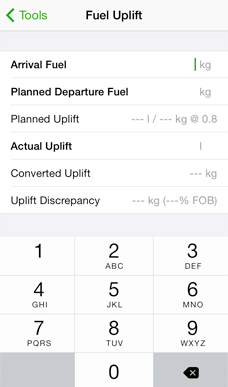
How can I change the specific gravity in the fuel uplift tool without switching to the Settings app?
Tap the "Planned Uplift" row to get a new screen where you can change specific gravity as well as units for weight and volume.
How can I show only the weather instead of the full brief when tapping the blue arrow button?
Tap and hold the blue arrow button to get a menu with different options.
How do I make use of the "airports://" URL scheme?
You can use the URL scheme to launch the app and display METAR & TAF and NOTAMs for airports you specify in the URL using IATA or ICAO codes.
Airports recognizes the following URLs:
Bug Reports and Suggestions
Click this link to report bugs or suggest new features.
Release History
2.16.13 (2013-05-06)
- Fixed crashes in low memory situations.
2.15.13 (2013-04-29)
- Major update to the Notes section! You can now add photos, PDF documents and many more file types to your notes.
- Easy to use document viewer within the app.
- Document Packs feature facilitates dissemination of airport documents to crew members.
- Fuel uplift tool now remembers unfinished calculations if you leave the tool.
- You can now reverse the order of airports in a favorite group.
- Database updates.
- *** Airports now requires iOS 5.1 or higher to run ***
2.14.12 (2013-02-02)
- Minor bug fixes.
- Database updates.
2.13.11 (2012-12-06)
- Temperature correction for the Approach Path Calculator.
- Airports in a favorite group can now be shown on a map.
- Airport pins on maps now show an airport overview when tapped (iOS Standard maps only).
- Database updates.
2.12.10 (2012-11-02)
- It is now possible to delete airports from the browser history on the iPad, as well as clear the history.
- Quick brief function lets you type multiple airports separated by commas in the search field.
- Database updates.
2.11.9 (2012-09-14)
- iOS 6.0 compatibility updates.
- The pre-iOS 6.0 satellite image data source can be selected in the app settings if preferred.
However, this data source does not provide images optimized for the retina display.
- Database updates.
- *** Airports now requires iOS 4.3 or higher to run ***
2.10.8 (2012-08-07)
- Fixed a bug that could lead to issues with the search screen when switching between keyboards of different height (iPhone/iPod touch only).
- All device orientations are now supported on iPhone/iPod touch.
- Database updates.
2.9.7 (2012-06-25)
- Minor bug fixes.
- Database updates.
2.8.6 (2012-05-29)
- iCloud sync to keep your data updated on all your devices (requires iOS 5.0 or later). This feature needs to be enabled in the app settings.
- Sharing of notes and favourite groups via email (import of data requires iOS 3.2 or later).
- For the iPhone, there is now a button to call the ATIS telephone line for airports that provide this service (Europe and U.S. at the moment).
- Fuel specific gravity and units can now be changed in the Fuel Uplift Tool by tapping the "Planned Uplift" row.
- "airports://" URL scheme added.
- Database updates.
2.7.5 (2012-04-23)
-
New data sources for weather and NOTAMs. There are now two data sources for each, selectable in the app
settings. The weather source will now default to Weather.aero and the NOTAM source will default to U.S. FAA.
These services should have the best reliability.
- Email weather and NOTAMs.
- Print weather and NOTAMs (requires iOS 4.2 or later).
-
Group colors: you can now color-code your favorite groups. Airports in the group will show the color in
search results, letting you easily see if an airport is for example a company destination or a preferred
alternate.
- Alternates for an airport can now be shown on a map.
-
Tap and hold on the blue arrow button for an airport or group lets you choose different actions (requires
iOS 3.2 or later).
- You can now copy the METAR and TAF text to the clipboard.
- You can now sort alternates by distance when editing.
- Daylight savings time information for all airports.
- The fuel uplift calculator now also shows uplift discrepancy as a percentage of FOB.
- Instructional text on how to report available approaches for an airport.
- Database updates.
2.6.4 (2012-04-12)
- Fixed an issue preventing download of TAF reports due to changes at the data provider.
2.5.4 (2012-02-23)
- The database now includes information on available instrument approaches for airports in USA,
Australia and Brazil as well as for major European airports.
- For iPhone and iPod touch: tapping the runway overview brings up a full screen overview chart.
- The NOTAM view now detects phone numbers, URLs and map coordinates in the NOTAM text.
- Airports now has its own time zone database, which will make updates in response to time zone changes
much quicker.
- You can now add airports to a favorite group directly from the group view.
- Fuel uplift calculator now uses specific gravity instead of density.
- Editing of notes on the iPad now mimics the iPhone version to take advantage of highlighting of phone
numbers, URLs and addresses in your notes.
- Magnetic variation added for all airports.
- Database updates.
2.4.3 (2012-02-04)
- Fixed an issue preventing download of TAF reports due to changes at the data provider.
2.3.3 (2011-12-05)
- NOTAMs for groups with more than 12 airports will now download correctly.
- Database updates.
2.2.2 (2011-11-17)
2.2.1 (2011-11-10)
- Fixed an issue preventing download of METAR & TAF due to changes at the data provider.
2.1.1 (2011-10-04)
- For iPad only: The satellite map may be replaced by a runway overview chart that can be used offline or when you want to limit the amount of data downloaded.
- "Nearby Airports" is now called "Alternates". The list can be edited to show your preferential alternates for each airport.
- Friction coefficient conversion to braking action now uses Russian scale for Russian airports. In the Runway State Group Decoder, tap the last row to switch between ICAO and Russian scale.
- New tool for great circle distance and initial track between two airports.
- It is now possible to clear a favorite group without deleting it.
- Weather and NOTAM data now auto-reloads after a longer time period than before.
- Database updates.
2.0.0 (2011-07-05)
- Major update! Airports now runs in full screen on the iPad!
- You can now get weather and NOTAM for all airports in a group by tapping the blue button.
- New tool: Fuel Uplift Calculator
- Sunrise and sunset times for every airport.
- Show neighboring airports, optionally restricted by runway length.
- Favorites can now be sorted by City/ICAO/IATA or manually.
- Favorites are now stored in the Documents folder so they can easily be moved between devices though iTunes File Sharing.
- Numerous small improvements.
- Database updates.
1.10.12 (2011-04-09)
- Upgraded database for the Middle East, Central America and Canada.
- Updated VOLMET database.
- General database updates.
1.10.11 (2011-03-02)
- Upgraded database for Africa.
- General database updates.
1.10.10 (2011-01-13)
- Upgraded database for Australia, Asia and the Pacific.
- General database updates.
1.10.9 (2010-12-18)
- More reliable SNOWTAM decoding.
- Local time now updates continously.
- Database updates.
1.9.8 (2010-11-15)
- Fixed a problem that could cause the weather server to return old data.
1.8.8 (2010-11-02)
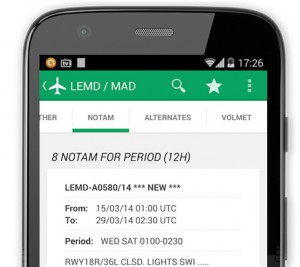
- Download and view NOTAMs.
- One tap decoding of SNOWTAMs.
- Standalone SNOWTAM decoder.
- Updated graphics for iPhone 4 Retina Display.
- Database updates.
1.7.7 (2010-07-26)
- Back up and share your notes through iTunes File Sharing. (Requires iOS 4)
- Google Map view of airports now integrated into the app.
- Unit settings for runway length and width are now separate.
- Tap the wind component results to toggle between different units.
- Upgrade of airport database for airports in South America.
- Fixed a bug with Tools under iOS 4.
- Database updates.
1.6.6 (2010-01-29)
- Fixed a bug where the iPod touch could not use offline weather in some circumstances.
- New database for Europe and USA with runway data (length, width, surface type) for most major airports. Other new data includes variation and time zone info.
1.5.5 (2009-10-01)
- Fixed a keyboard bug in the Tools section (iPhoneOS 3.1 only).
- Database updates.
1.4.4 (2009-09-08)
- Favorites section where you can organize your favorite airports in groups.
- Phone numbers and URLs are now highlighted in your notes. The Phone application or Safari is launched when the link is tapped.
- Downloaded weather is saved and kept for 48 hours for offline viewing.
- You can now go to the airport information page from the VOLMET view.
- Support for landscape mode in weather view.
- ATIS frequencies are now shown in the main airport list.
- Database updates.
1.3.3 (2009-05-18)
- Fixed a bug with decoding of runway state groups.
- Database updates.
1.2.2 (2009-04-13)
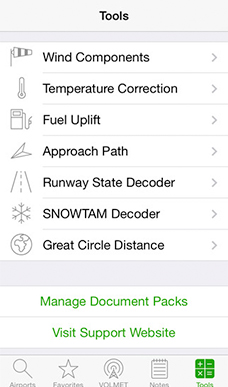
- New Tools section with tools to calculate wind components, temperature correction and decoding runway state groups from METARs.
- Runway state groups in METARs are automatically detected and gives you the option to decode them with one tap.
- Shortcut to weather page: click on the blue button in the airport search list to go directly to METAR and TAF for that airport.
- Customizeable units of measurement for altitude and wind speed.
- Database updates.
1.1.1 (2009-01-06)
- Fixed a bug that could cause problems when displaying METAR and TAF data.
- Database updates.
1.0.0 (2008-12-20)
Copyright 2008-2012 Peter Lundkvist. All Rights Reserved.